Copyfish Free OCR Software: Extract Text from Images, Videos, and PDFs
Copyfish Free OCR Software is a powerful tool that allows users to easily extract text from images, videos, and PDF documents. With just a few clicks, you can convert text within any captured image into an editable format without the need for retyping. This makes it incredibly convenient to reuse the extracted text in digital documents, emails, or reports.
Whether you need to google, store, email, or translate the text from images, Copyfish provides a faster and more enjoyable alternative to manual typing. It supports various types of images, including photographs, charts, diagrams, screenshots, PDF documents, comics, error messages, memes, Flash, and even Youtube movies.
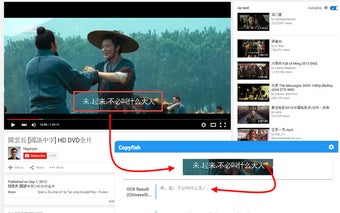
One of the standout features of Copyfish is the ability to verify the accuracy of the extracted text through an overlay. This allows you to quickly review the results and make any necessary corrections.
For users who frequently switch between OCR languages, Copyfish offers the option to define "Quick Switch" buttons for up to three languages on the settings page. This makes it convenient to extract text in different languages without any hassle.
Language learners will also find Copyfish useful, as it can extract text from images that other translator addons may not be able to access. This includes text within images, tricky Javascript/AJAX, and movie subtitles on platforms like Youtube or Youku. Copyfish even provides a repeat feature specifically designed for subtitle translation. Simply mark the area of the subtitle once and use the "Do OCR" button to grab the latest text from the movie screen.
Unlike other addons that alter website content, Copyfish takes a different approach by allowing users to mark the text in the image they want to extract. This ensures compatibility with every website, including videos and PDF documents.
If you have any questions or suggestions, please feel free to email